
Download Mpeg Splitter – Video Editing Tool, MPEG Splitter, Utility App
Overview
Mpeg Splitter is a focused mobile application designed to address a common yet specific need in digital media management: the ability to split MPEG video files into smaller segments. Unlike full-featured video editing platforms, this tool operates with a singular purpose—efficiently dividing longer video files without the complexity of advanced editing features. It caters to users who want to trim unwanted sections, extract highlight clips, or prepare video content for sharing or storage optimization.
The app is particularly useful for individuals managing personal video collections, educators creating short instructional clips, or content creators needing to isolate segments for social media. While the developer did not provide additional background information, the app’s long-standing presence since its release on June 18, 2008, suggests a stable and reliable functionality. Its enduring relevance highlights its value in the mobile utility ecosystem, where lightweight, task-specific tools continue to serve niche but essential functions.
The app fills a gap in the market for users who seek speed and simplicity over extensive customization. By concentrating on one core function, Mpeg Splitter avoids feature bloat and delivers predictable results, making it a practical solution for users with basic video editing needs.
Key Features & Functionality
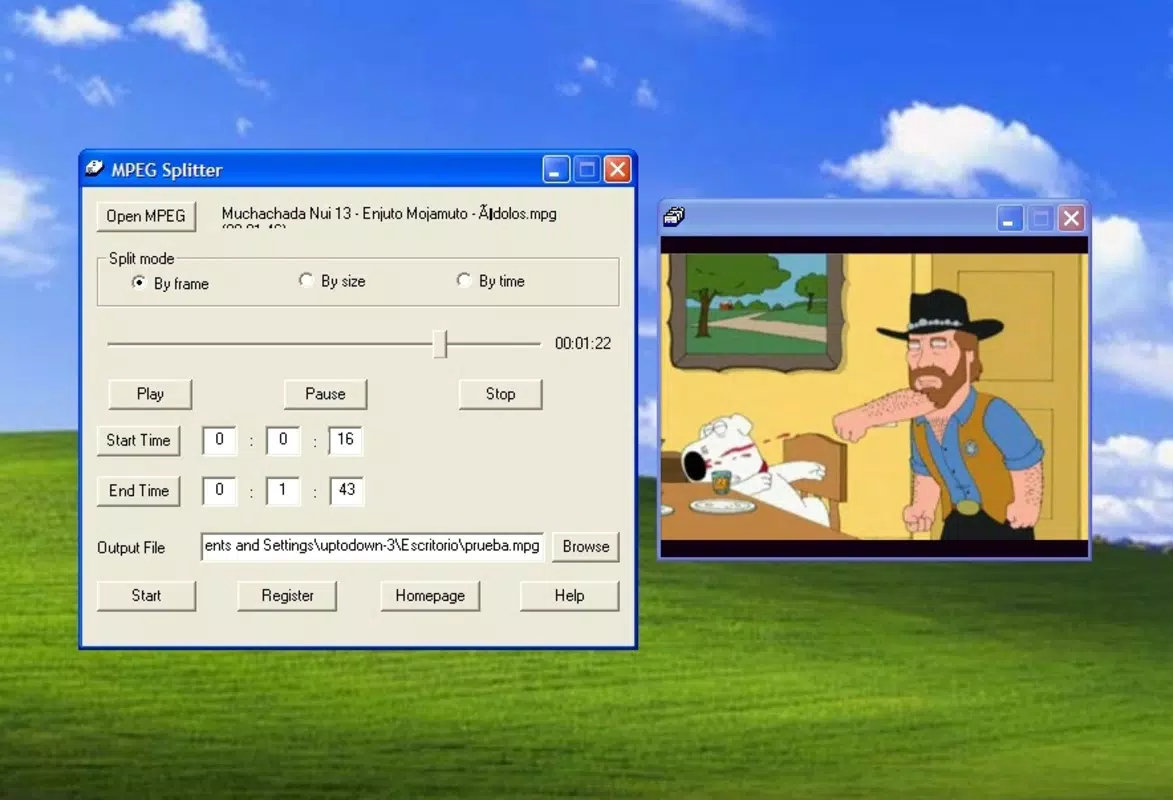
- Core Video Splitting Function – The primary functionality allows users to divide MPEG files at user-defined start and end points. This enables precise extraction of desired segments or removal of unwanted parts, ideal for trimming long recordings or isolating key moments.
- Simple File Loading and Navigation – Users can load video files directly from their device storage, with a streamlined process that minimizes steps between file selection and editing.
- Minimalist Interface with Direct Controls – The interface prioritizes accessibility by presenting essential tools without clutter. Although not highly intuitive, the layout supports quick learning for first-time users.
- Fast Processing Without Quality Loss – The app processes video splits efficiently, maintaining the original video quality and avoiding re-encoding delays, which is critical for users managing large files.
- Output File Management – After splitting, users can save the resulting segments directly to their device’s storage, with options to rename and organize files as needed.
For example, a student might use Mpeg Splitter to extract a five-minute lecture segment from a two-hour recording, or a hobbyist could isolate a highlight clip from a family event video. The tool’s focus on speed and precision ensures that users achieve their goals without navigating complex menus or waiting for lengthy processing times. This efficiency makes it a practical choice for on-the-go editing needs, especially when professional software is unnecessary or unavailable.
Interface, UX & Performance
The user interface of Mpeg Splitter is designed with functionality over aesthetics, offering a clean but utilitarian layout. Navigation is linear, with primary controls—file selection, split point markers, and output options—placed within easy reach. While the interface is not the most visually engaging, it avoids unnecessary distractions, allowing users to focus on the core task.
The app’s responsiveness appears consistent across various device categories, though the developer did not list formal performance metrics. Although the developer did not specify minimum OS requirements, the app’s long-standing presence suggests compatibility with a range of older and modern devices. Stability is implied by its continuous availability since 2008, indicating a low crash rate and reliable operation.
The app maintains smooth playback during preview and processing, with minimal lag during file loading and split execution. Users can expect consistent performance when working with standard MPEG files, though large files may require more time depending on device capabilities. Overall, the UX prioritizes task completion over visual polish, making it suitable for users who value efficiency and dependability over flashy design.
Platform Compatibility & Technical Requirements
Mpeg Splitter is available for Android, though specific OS version requirements were not listed. The app’s file size is not disclosed in the provided information, which limits insight into storage impact. The current software version is not specified, but its release date of June 18, 2008, indicates it has been in circulation for over 15 years.
This longevity suggests a stable codebase and compatibility with evolving Android environments, though users should exercise caution when installing older apps on newer systems. The developer did not provide additional technical details such as RAM requirements, processor specifications, or supported video formats beyond MPEG. Compatibility information was not fully disclosed, so users should verify functionality on their specific device before installation.
Despite these gaps, the app remains accessible through standard distribution channels, and its continued presence implies ongoing support or at least functional maintenance.
Pros and Cons
Pros
- Efficiently splits MPEG video files without re-encoding, preserving original quality.
- Minimal learning curve—ideal for users without video editing experience.
- Designed for speed and simplicity, enabling quick edits without complex steps.
- Free to download and use, making it accessible for budget-conscious users.
- Lightweight and focused on a single core function, reducing system overhead.
Cons
- Only supports MPEG video files; no indication of support for other formats.
- Interface lacks visual polish and may feel outdated to newer users.
- Developer did not provide information on minimum OS requirements or file size.
- Version and update history are not disclosed, raising questions about ongoing maintenance.
- No cloud integration or advanced export options beyond basic file saving.
FAQ
Is Mpeg Splitter safe to download and install?
Yes, the app is available through trusted distribution channels. However, as it has not been updated since 2008, users should ensure their device’s security settings allow installation from unknown sources and review permissions carefully.
Can I use Mpeg Splitter on iOS devices?
The available information specifies Android as the platform. No details were provided about iOS compatibility, so it is not confirmed for Apple devices.
Does Mpeg Splitter support formats other than MPEG?
Based on the provided description, the app is designed specifically for MPEG files. There is no mention of support for MP4, AVI, or other common video formats.
How do I update Mpeg Splitter?
The current version and update history were not disclosed. Users should check the source of the app for the latest available build, though no official update mechanism is confirmed.
Is Mpeg Splitter free to use?
Yes, the app is available at no cost. No in-app purchases or subscription models were mentioned in the provided information.
Final Thoughts
Mpeg Splitter stands out as a niche but valuable tool in the mobile app landscape. Its singular focus on splitting MPEG videos with minimal effort makes it a reliable choice for users who need quick, no-frills editing. While it lacks modern design elements and advanced features, its efficiency, simplicity, and lack of cost offer significant value for specific use cases.
It’s particularly beneficial for educators, students, and casual content creators who manage MPEG files and require fast, straightforward edits. For those seeking a lightweight utility that gets the job done without complexity, Mpeg Splitter delivers a practical solution. Though it may not appeal to users seeking a polished or feature-rich experience, its enduring functionality proves that purpose-driven apps still hold relevance.
Download Mpeg Splitter now.


